The Complete Organization Management System
Manage your organization, members, events, payments, and more with our comprehensive management platform.
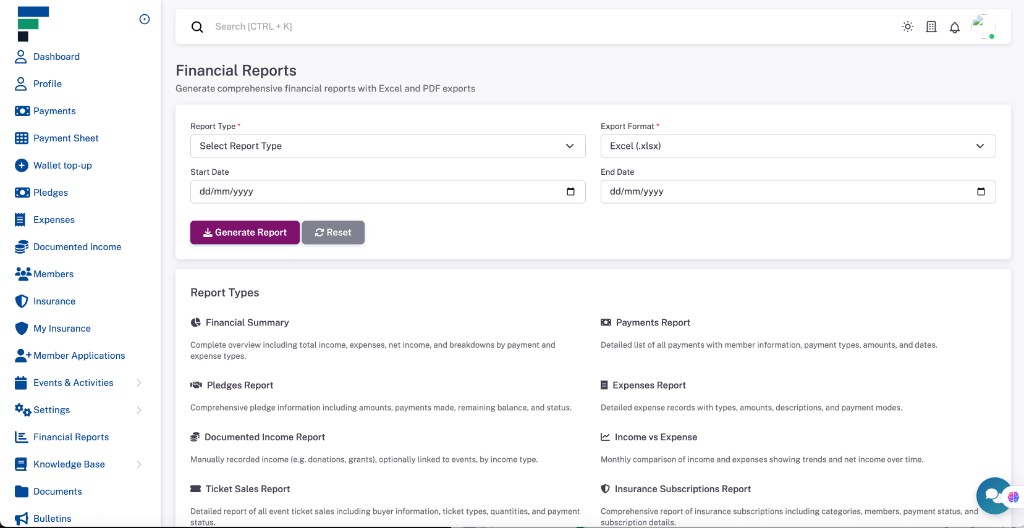
Manage Your Organization with Ease
Everything you need to manage your organization efficiently in one place.
Member management
Unified directory, roles, and public registration—multi-organization aware.
Financial visibility
Financial management
Payments, receipts, QR flows, pledges, and documented income & expenses.
Insurance & services
Group insurance categories, member subscriptions, and online collection.
Reports & analytics
Exports, dashboards, and operational transparency for leadership.
Built for every organization
Workflows that adapt to associations, clubs, alumni groups, unions, and communities.
Professional associations
- check_circle Certification & renewals
- check_circle Professional directory
Religious organizations
- check_circle Congregation & pledges
- check_circle Events & services
Social clubs
- check_circle Membership tiers
- check_circle Calendar & RSVPs
Alumni associations
- check_circle Graduate network
- check_circle Fundraising
Trade unions
- check_circle Dues & branches
- check_circle Activity reporting
Community groups
- check_circle Volunteers
- check_circle Project expenses
Value for everyone
- done_all Automation & reminders
- done_all Real-time visibility
- done_all Deep permissions
- done_all Self-service profile
- done_all Receipts & history
- done_all Events & insurance
- done_all Financial transparency
- done_all Security-minded design
- done_all Less operational overhead
Get started in minutes
Onboarding built for busy leadership.
Register
Create your admin account and verify email.
Profile
Set organization details and parameters.
Invite
Import members or share public links.
Configure
Roles, dues, insurance, and events.
Manage
Run your organization with confidence.
Desktop power.
Mobile agility.
Progressive Web App—add to home screen, fast loads, and notifications where supported.
-
bolt
Zero-install convenience
No app store gatekeeping for your members.
-
cloud_off
Works offline-first where enabled
Keep working when connectivity drops.
Architected for trust
Encryption in transit, disciplined access, and backups—your data treated as a core asset.
Encryption
HTTPS and protected storage for sensitive operations.
Privacy-aware
Designed for responsible data handling and consent.
Reliable ops
Monitoring, backups, and sensible infrastructure practices.
Backups
Regular snapshots to reduce data-loss risk.
Choose Your Plan
Select the plan that best fits your organization needs
Trial
Free trial plan with basic features
- check 14 day trial
- check Members
- check Payments
- check Receipts
- check Pledges
- check Expenses
- check Events
- check Committees
- check Subgroups
- check Tasks
- check Attendances
- check Member-roles
- check Payment-types
- check Expense-types
- check Pledge-categories
- check Organizations
- check Knowledge-base
- check Max Members: 50
- check Max Events: 10
Basic
Basic plan with essential features for small organizations
- check 7 day trial
- check Members
- check Member-import
- check Payments
- check Receipts
- check Pledges
- check Expenses
- check Events
- check Committees
- check Subgroups
- check Tasks
- check Attendances
- check Member-roles
- check Payment-types
- check Expense-types
- check Pledge-categories
- check Organizations
- check Knowledge-base
- check Export
- check Reports
- check Max Members: 200
- check Max Events: 50
Premium
Premium plan with advanced features for growing organizations
- check 7 day trial
- check Members
- check Member-import
- check Payments
- check Receipts
- check Pledges
- check Expenses
- check Events
- check Recurring-events
- check Event-tickets
- check Committees
- check Subgroups
- check Tasks
- check Attendances
- check Member-roles
- check Payment-types
- check Expense-types
- check Pledge-categories
- check Organizations
- check Organization-registration
- check Knowledge-base
- check Bulletins
- check Notifications
- check Chatbox
- check Support-tickets
- check Insurance
- check Export
- check Reports
- check Advanced Reports
- check Payment-gateways
- check Max Members: 1000
- check Max Events: 200
Enterprise
Enterprise plan with all features for large organizations
- check 7 day trial
- check Members
- check Member-import
- check Payments
- check Receipts
- check Pledges
- check Expenses
- check Events
- check Committees
- check Subgroups
- check Tasks
- check Attendances
- check Member-roles
- check Payment-types
- check Expense-types
- check Pledge-categories
- check Organizations
- check Organization-registration
- check Knowledge-base
- check Bulletins
- check Notifications
- check Chatbox
- check Support-tickets
- check Insurance
- check Export
- check Reports
- check Advanced Reports
- check Payment-gateways
- check Api Access
- check Custom Branding
Frequently Asked Questions
Find answers to common questions about our platform
How do I record a payment from a non-member? expand_more
How do I record a cash or transfer payment for insurance? expand_more
How do I sell tickets for an event? expand_more
How do I enable event registration with QR codes? expand_more
How do I create a recurring event? expand_more
How do I generate a financial report? expand_more
How do I submit a support ticket? expand_more
How do I configure Paystack or Monnify for my organization? expand_more
How do I view the calendar of events? expand_more
How do members subscribe to insurance? expand_more
Start Your Free Trial Today
Get started today and see how we can help manage your organization more effectively
Get started for free